MK-PushMAN
Mute, solo, launch clips and select tracks from a 16-pad Push 3 layer.
Ableton Live 12 with Max for Live; Push 3; macOS or Windows. Tested with Live 12.4.
Store price checked 5 September 2026. Taxes and final price are shown at checkout. The device and PDF manual are included.
Install and connect
- Unzip your Gumroad download. Keep the QuickStart PDF with the MK-PushMAN.amxd device.
- Copy the device into your Ableton User Library, or drag it into your Live Set. A return or utility track keeps it easy to find.
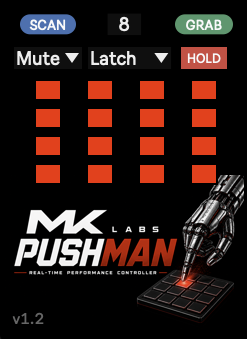
- Connect Push 3. PushMAN scans automatically on load. Use SCAN after adding, deleting or reordering tracks, and GRAB if Push reconnects.
- Press New on Push 3 to open the 4×4 control layer. Select Mute, Solo or Clip in the device.
These steps describe Push 3 in Controller mode, connected to Live on a computer. Standalone support is also listed on the product page; check compatibility with your current firmware before buying for a Standalone setup.
The pad layer
PushMAN scans up to 32 Live tracks and maps up to 16 non-group tracks. It does not expose individual Drum Rack chains as separate pads.
- Mute / Solo / Clip: choose what the mapped pads control.
- HOLD: in Mute mode, hold a pad to mute its track and release it to restore the previous mute state.
- New: show or hide the performance layer.
- Capture: open the channel selector; a pad selects its mapped track.
- PadMode: Latch keeps the New or Capture layer open until pressed again. Mom keeps it open only while held. This is separate from HOLD.
Before a performance
Wrong tracks on the pads? Rescan after structural changes to the Set. Drum Rack chains are not individually mapped.
Push was disconnected? Reconnect it, then use GRAB to rebind its controls.
Unexpected expression? With Live 12.4, XYZ / MPE can still reach compatible instruments or Macro Variations under the pad area. Disable unwanted expression mappings before performing.
Version 1.2.1 fixes Capture restore and New-button pad-layer release behaviour. PushMAN depends on Live and Push control-surface behaviour; test your actual Set after an Ableton or firmware update.
The included QuickStart PDF has the full button reference. For support, include your Live version, Push mode, device version and steps to reproduce the problem.